Posts

Showing posts with the label IBM Fusion

IBM Fusion HCI Adds the Choice of Dell Servers

Image
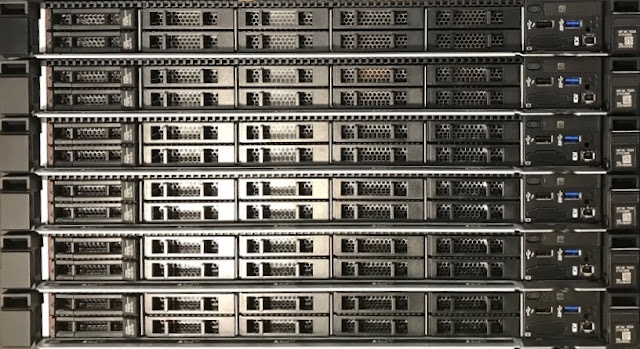
IBM Fusion HCI System has announced today a significant new choice for customers when configuring the hardware of a Fusion HCI System. Now customers can choose to build their Fusion HCI systems using Dell servers! The primary building blocks of a Fusion HCI System are the servers that provide the storage and compute resources.  Now customers can choose between either Lenovo or Dell servers for these building blocks when defining the hardware of their Fusion HCI systems. The new Dell servers are PowerEdge R660XL servers.  They come in both 32-core and 64-core configurations using Intel Xeon 4 "Sapphire Rapids" processors and high-speed DDR5 RAM.  The 32-core Dell servers come standard with 256GB of RAM that can be optionally doubled to 512GB RAM.  The 64-core Dell servers come standard with 1024GB RAM which can also be doubled to give 2048GB of RAM -- that's 32 GB of RAM per core! These Dell servers can optionally include up to 10x hot-swappable PCIe Gen 5 SED NV...


IBM Fusion HCI System Levels Up

Image
IBM Fusion HCI System has "leveled up" over the past several months bringing powerful new hardware capabilities to the platform as well as more choice and flexibility in how the system can be configured to meet application needs. The primary building blocks of a Fusion HCI System are the servers that provide storage and compute resources and these are now more powerful.  Both the 32-core and 64-core servers now come with Intel Xeon 4 "Sapphire Rapids" processors and high-speed DDR5 RAM.  The 32-core servers come standard with 256GB of RAM that can be optionally doubled to 512GB RAM.  The 64-core servers come standard with 1024GB RAM which can also be doubled to give 2048GB of RAM -- that's 32 GB of RAM per core! The performance and choice of Fusion HCI storage options have also leveled up.  New Samsung PM1743 PCIe Gen 5 NVMe drives are now used to create the storage cluster, giving a performance boost over the previous Gen 4 drives.  And now both 3.84TB and...

Fusion HCI Adds 8x the GPU Power

Image
IBM Storage Fusion HCI System has released a new GPU server today that takes a huge step forward in the support of AI applications.  The new server, called the G03, can be configured to have as many as 8 double-wide GPU adapter cards .   Fine-tuning and inferencing with foundation models used in AI applications increasingly requires faster and more powerful hardware, and the Fusion HCI G03 meets that need head on! The tremendous boost provided by the G03 for AI apps comes from having up to 8 of the  NVIDIA L40S  GPU PCIe double-wide adapter cards inside a single server.  The L40S is powered by the NVIDIA Ada Lovelace Architecture and is designed for generative AI and LLM training and inferencing.  It contains fourth generation tensor cores and the latest transformer engine that puts those tensor cores to good use. The design of the G03 provides flexibility for deploying GPU resources.  Many organizations will order the G03 with a full complement o...

Fusion HCI Performance Boost for AI Apps

Image
Fine-tuning and inferencing with foundation models used in AI applications increasingly requires faster and more powerful hardware as AI foundation models grow ever larger.  In response to this need, IBM Storage Fusion HCI System released a new GPU server option earlier this month called the G02 that gives a performance boost for AI applications. The new G02 GPU server is based on the Lenovo SR650 V3.  The configuration used in the G02 includes a pair of Intel Xeon Gold 6418H 24-core "Sapphire Rapids" processors.  This processor model includes Intel Deep Learning Boost, designed to accelerate AI use cases by extending the Intel AVX-512 instruction extension with a new instruction that increases deep learning inference performance. But the big boost provided by the G02 for AI apps comes from the three  NVIDIA A100 80GB GPU PCIe adapter cards in each G02 server.  This newer version of the A100 has u p to 1.25x higher AI inference performance over the A100 40...

A New Direction for IBM Storage

Image
Yesterday, there were several significant announcements made about the branding and strategy of IBM's storage product portfolio.  And because the product that I so often write about is an important part of the portfolio, it was affected by these changes.   IBM has dropped the "Spectrum" brand and so what was IBM Spectrum Fusion HCI will now be known as IBM Storage Fusion HCI System . These changes are being made to align the portfolio with clients' most pressing data challenges.  IBM Storage solutions are now aligned under one of the three major data challenges faced today by organizations: AI and hyper data growth; connecting edge-to-core-to-cloud(s); and data resiliency.  Respectively, these challenges are addressed by the following IBM Storage solution categories: IBM Storage for Data and AI, IBM Storage for Hybrid Cloud, and IBM Storage for Data Resiliency. IBM Storage Fusion products are aligned under the category  IBM Storage for Hybrid Cloud . T...

Energizing IBM Spectrum Fusion HCI

Image
  Nothing happens in an IBM Spectrum Fusion HCI system without electricity.  I know that this is obvious, but sometimes we forget how important it is to get the supply of electrical power correct when setting up a system.  Fusion HCI is designed to be flexible when it comes to electrical power supply so that it can adapt to the local situation in countries all over the world.  Fusion HCI is also designed to be resilient to power supply failures.  Let's examine the components in Fusion HCI that contribute to that design. Layers of Power Resiliency Each Fusion HCI rack  contains multiple power distribution units (PDUs), and every component in the rack plugs into these PDUs.  In turn, each of these PDUs plugs into a power connection in the data center.  You can think of these PDUs as industrial-strength power bars.  Each PDU has twelve C13 receptacles into which the power cords from the rack components plug.  The C13 is the most com...

New Storage Server Options in Spectrum Fusion HCI 2.4

Image
On December 15, the new 2.4 version of IBM Spectrum Fusion HCI was released.  From a system hardware perspective, the most significant change in this release is the availability of powerful new storage servers.  The new storage servers have a total of 64 cores (128 threads) of processing power that comes from two AMD EPYC 3 7543 processors.  To support the applications using all these cores, there is 1024GB of RAM in each server, which works out to be 16GB/core.  While it's true that such 64-core servers were already available for Spectrum Fusion HCI, what is different now is that these servers come with a minimum of two Samsung 7.68TB PM1733 PCIe Gen 4 NVMe drives.  And they can be expanded to have up to 10 of these drives. With these new storage servers come new options for creating the base storage cluster in the system.  Previously, because there was only one storage server configuration available, there was only one way to build the base st...

Upgraded Compute Power for IBM Spectrum Fusion HCI

Image
  Big news!   A new and more powerful compute node is now available for the IBM Spectrum Fusion HCI product!  This new compute node provides double the number of cores and quadruple the amount of RAM compared to the original compute nodes that were released a year ago. CPU and Memory Like previous Spectrum Fusion HCI compute nodes, the new compute node is built upon a 1U Lenovo SR645 server.  The difference is that the two processor sockets inside are each populated with an AMD EPYC 7543 processor.  The EPYC 7543 is a 32-core, 64-thread processor that operates with a base clock speed of 2.8 GHz and comes with 256GB of cache.  With two of these processors, the server has a total of 64 cores and 128 threads available for running  applications on  Red Hat OpenShift. The AMD 7543 processor is part of the AMD EYPC 3 processor family, sometimes referred to as the "Milan" family.  AMD says that EPYC 3 brings a 19% improvement to its instruct...

Support for AI and ML Apps in IBM Spectrum Fusion HCI

Image
  In my last post , I went into detail describing the storage/compute servers that provide the storage cluster and most of the computing power in an IBM Spectrum Fusion HCI system .  In this post, I take a close look at one of the optional server types that can be added to a Spectrum Fusion HCI system, the GPU server .   It is an  NVIDIA-Certified System  that has passed certification tests to validate its performance, reliability, and scale for a wide range of workloads.   I detail the CPU, memory, storage, and network elements inside these GPU servers and, of course, the GPU adapters. CPU and Memory A Spectrum Fusion HCI GPU server is built from a Lenovo SR665 server that is two rack units (2U) high.  (A rack unit is an industry standard that translates to 1.75 inches; an industry standard data center rack used to hold servers and switches is 42U tall.)  Inside the server are two processor sockets that are each populated with an AMD EPYC 7F...

Inside the Storage/Compute Servers of IBM Spectrum Fusion HCI

Image
Previously, I provided an overview of the IBM Spectrum Fusion HCI hardware followed by posts giving an overview of the different server and switch components that go into that system. Most of the servers in an IBM Spectrum Fusion HCI system will be storage/compute servers, so you can think of these servers as the workhorses of the system. In this post, I take a closer look at the CPU, memory, storage, and network elements inside these storage/compute servers. CPU and Memory A storage/compute server is built from a Lenovo SR645 server that is one rack unit (1U) high.  (A rack unit is an industry standard that translates to 1.75 inches; an industry standard data center rack used to hold servers and switches is 42U tall.)  Inside the server are two processor sockets that are each populated with an AMD EPYC 7302 processor.  The EPYC 7302 is a 16-core, 32-thread, processor that operates with a base clock speed of 3.0 GHz.  With two of these process...

Spectrum Fusion HCI on YouTube

Image
I'm pleased to announce that I've recorded a YouTube video in which I introduce and describe the hardware of IBM Spectrum Fusion HCI and the software stack that the hardware supports. Specifically, I go into detail on the advantages of installing Red Hat OpenShift on the bare metal of Spectrum Fusion HCI , and how such a bare metal installation unlocks powerful OpenShift features such as OpenShift Virtualization and sandboxed containers (integrating the Kata Containers project). You will find the video here:  https://youtu.be/7JwhMJ9DUtA Many thanks to Tricia Jiang and Sean Sperry who organized this video project and did the editing to pull it together. Photo by Jakob Owens on Unsplash

Connecting It Together in IBM Spectrum Fusion HCI

Image
  In my previous post , I wrote about the different types of servers that are available for use in the IBM Spectrum Fusion HCI product.  There are storage/compute servers and compute-only servers that make up the bulk of the system, with optional servers available to add GPU capability and to add storage networking capability.  In this post, I will take a look at the network switches that connect all these servers together and also provide the uplink ports for connecting the Spectrum Fusion HCI system to the data center network and beyond. You might be wondering why network switches are even included in Spectrum Fusion HCI. Wouldn't it just be easier to connect all the servers to network switches that are already available in the data center?  Easier, yes, but that shortcut would certainly weaken the value of the offering.  Having integrated, redundant network switches makes the product easier to ...

The Servers that Power IBM Spectrum Fusion HCI

Image
In my previous post, I gave an introduction to the hardware of the IBM Spectrum Fusion HCI product and described how  Spectrum Fusion HCI was designed to be  simple to deploy and operate,   resilient to failure,  and  provide a high level of performance .  You can find that introductory post here .   In this post, I take a closer look at the server components of Spectrum Fusion HCI. There are four different server types that can be included in Spectrum Fusion HCI, and I'll discuss each of them in turn: Storage/compute servers, the basic building block Compute-only servers, for boosting compute power GPU servers, for AI applications AFM servers, for connecting to a larger storage network The Basic Building Block The "HCI" in the product name stands for Hyper-Converged Infrastructure and describes a style of system design in which pieces of the d...

An Introduction to the Hardware of IBM Spectrum Fusion HCI

Image
IBM Spectrum Fusion is a new family of products from IBM that is designed to bring together application storage services from IBM's rich Spectrum storage product portfolio and deliver them on Red Hat OpenShift, the platform that supports IBM's hybrid cloud strategy.  There are two products in the IBM Spectrum Fusion family.  IBM Spectrum Fusion Software is designed for deployment into an existing Red Hat OpenShift environment and IBM Spectrum Fusion HCI is an integrated offering that combines all the necessary hardware and software to create an OpenShift environment that can be up and running just hours after it is plugged in and connected to the network. IBM created Spectrum Fusion to address the data challenges that organizations are experiencing getting applications out of pilot and into production. To make this possible, Spectrum Fusion  enables applications to access any data anywhere and  protects  app...